Esapanel Italiano Free trial

A control panel, with application modules

Logs, monitoring and DMARC on a server of your own.

Esapanel is installed on a Debian server and offers ready-made services: log collection, checks on servers and sites, DMARC reports, an off-site space for copies. You use them for your company or give them to your customers, with your plans and your brand.

The trial license lasts 15 days.

One panel, several services

The panel is the common base. Each module adds a service: you choose which ones to install on the server, and add others when you need them.

CSP

Central Syslog

Collects the logs of servers and network devices, keeps them, and lets you search, analyse and summarise them in reports.

  • Syslog from routers, firewalls and other devices; an agent for Windows and Linux servers
  • Event alerts with rules that are already on: attempts to guess a password, sign-ins at night, configurations changed
  • Daily, weekly and monthly reports, also useful to document the measures required by NIS2
  • An archive of the older logs, and the import of those of past years
Discover CSP Documentation

UCP

Uptime Check

Checks all the time that servers, firewalls, sites and services answer, and alerts when something stops working.

  • Checks such as "the site answers", "port 443 is open", "the certificate does not expire soon"
  • The problems on a single page, to acknowledge
  • Downtimes scheduled for maintenance, without useless alerts
  • The availability of each host over time

Discover UCP Documentation

DRP

DMARC Report

Collects the DMARC reports of the domains and shows them in a readable way, instead of the XML files that the mail receivers send.

  • You see whether all the legitimate mail passes SPF and DKIM
  • You see who sends mail in the name of the domain
  • The reports arrive in a mailbox, or are uploaded by hand

Discover DRP Documentation

WFP

Web File

Offers an off-site space for the backups and file copies of NAS, servers and PCs, and checks that the copies arrive.

  • With the programs already in use: Synology Hyper Backup, QNAP Hybrid Backup Sync, Duplicati, Plesk, rsync
  • An alert when a device stops uploading, or sends an incomplete copy
  • Weekly and monthly reports of the days the copies arrived
  • The remote copy, every night, to a second server

Discover WFP Documentation

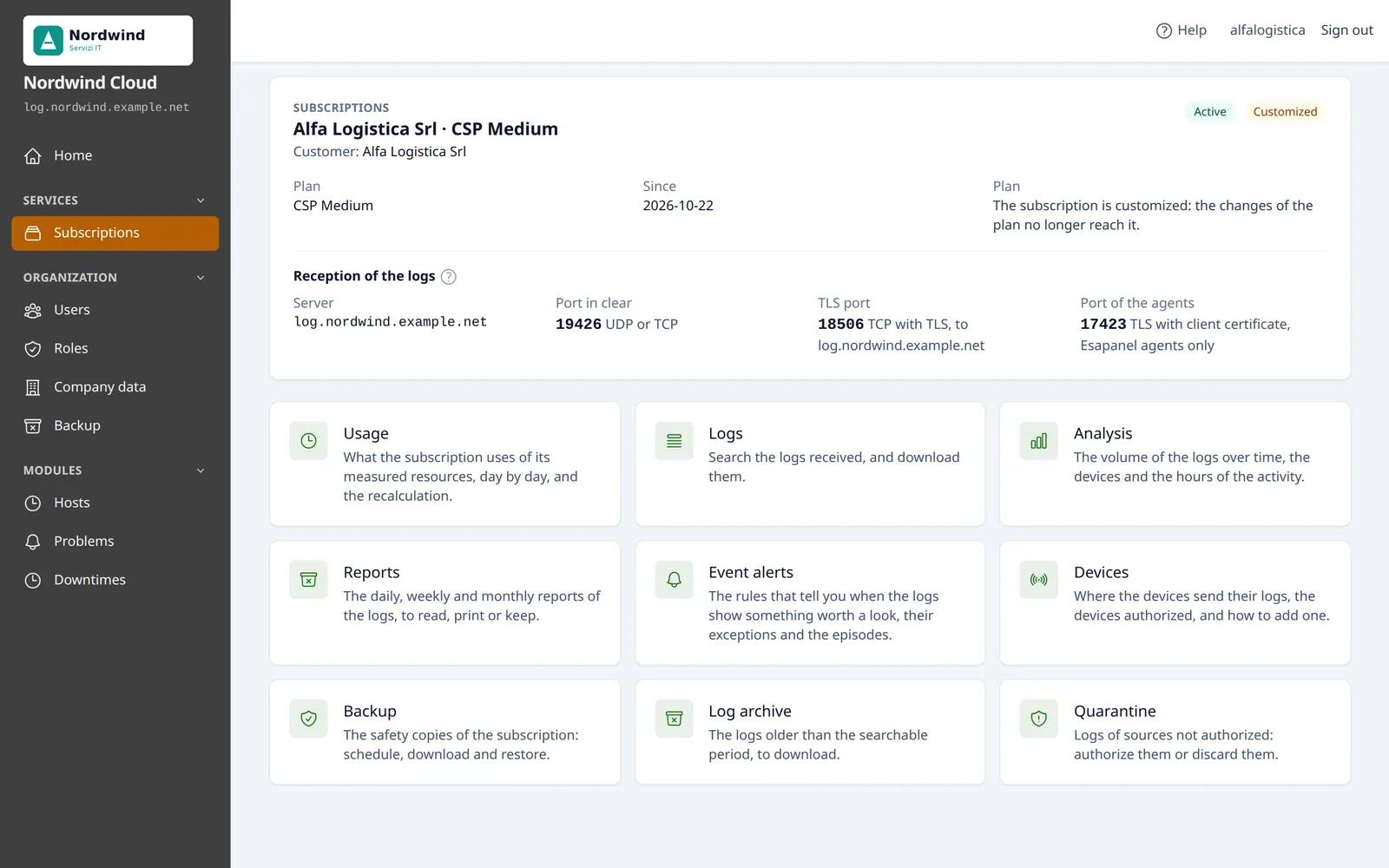
The page of a CSP subscription, with the tiles of its functions
A CSP subscription as the customer sees it, with the brand of its provider. Sample data.

For one company, or for those who look after many

The same panel has three license levels. The license is per server, and says which modules are there and who can use the panel.

Your company

Company license

A server for your devices and your services. Everyone has an account of their own, with a role that decides what they can see and do.

System integrators and MSPs

Integrator license, for 30, 60 or 100 customers

A server for your customers. Each customer signs in to the panel and sees only their subscriptions; you prepare the plans, set the limits and keep an eye on everything.

How the services are sold

Providers

Provider license

Customers and resellers. Each reseller resells the services to their own customers under their own brand, within the limits of the plan you give them.

How the services are sold

What is on every server

Whatever modules are installed, the panel brings what it takes to sell the services and manage the server.

Plans and subscriptions

You prepare a few plans and assign them. When you change a plan, the subscriptions that follow it change with it.

Your brand

Your name, your logo, your support contacts, your signature in the emails and an address of your own for the panel.

Users and roles

System roles and custom roles, and the second factor for signing in.

API

To connect a billing system, such as WHMCS, which activates and suspends the services, or your own scripts.

Notifications

Emails when a resource is near its limit, a backup fails or a device goes silent. You choose who receives them and with which text.

Backups and disaster recovery

Backups of the configuration of each organization, and the backup of the whole server to rebuild it on a new machine.

Security from the start

A firewall active from the installation, fail2ban and automatic Debian security updates.

Updates

New versions arrive from the package repository. The panel updates by itself, or when you decide.

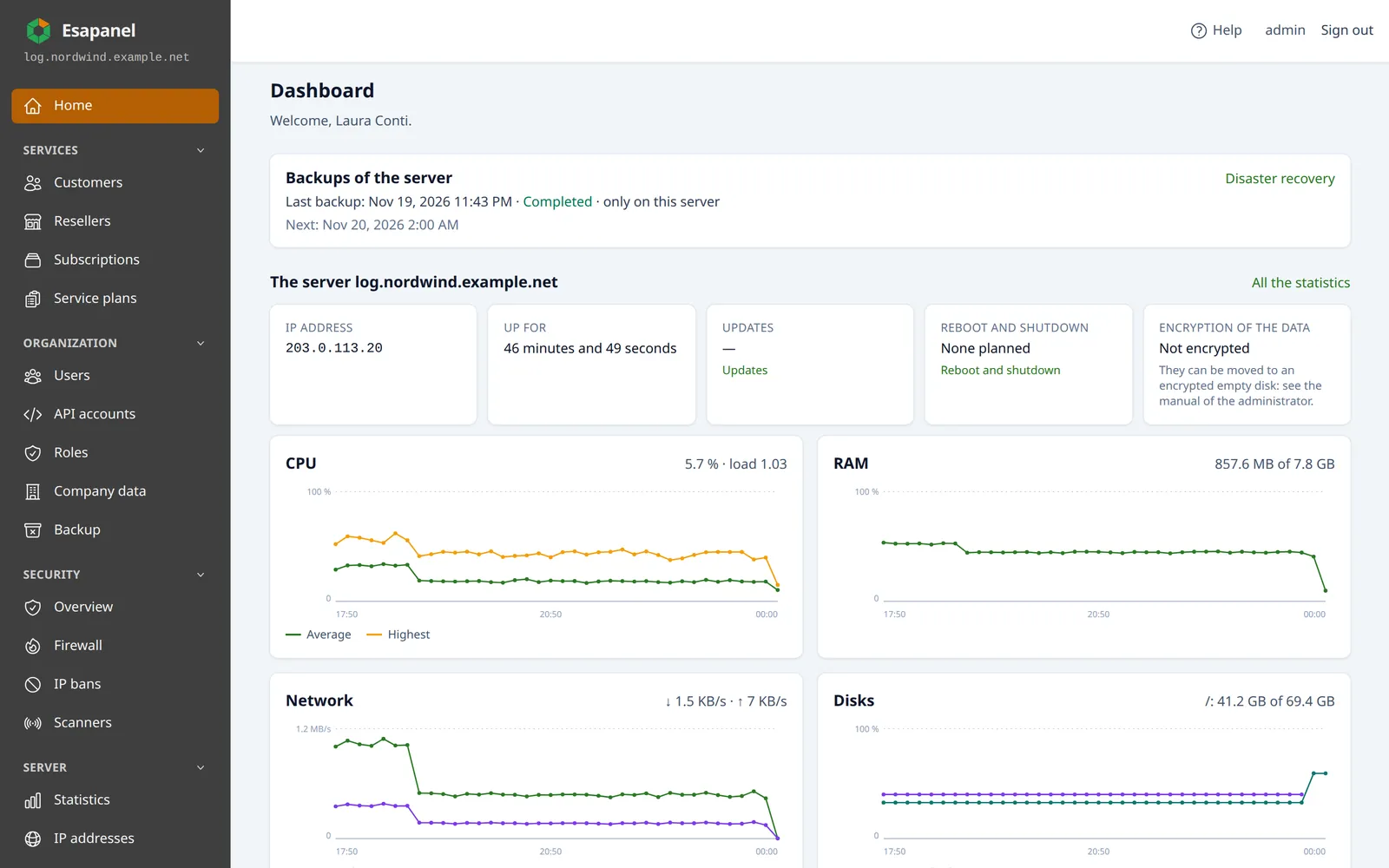
The home page of the administrator: server backups, status and charts of CPU, RAM, network and disks
The home page of the administrator: the backups of the server, the status and the resources. Sample data.

Up and running with one command

You need a freshly installed Debian 13 server, physical or virtual, a VPS too.

  1. Prepare the server

    Debian 13, amd64 or arm64, with its final name and address. A separate disk is a good idea for the logs and for the off-site copies.

  2. Run the installation

    A script adds the package repository, installs the panel with the modules you choose and configures the server.

  3. Sign in and activate the license

    Open the address of the panel, enter the activation code and ask Let's Encrypt for the certificate.

The installation guide

Try Esapanel on your server

The trial license lasts 15 days. Tell us which modules you are interested in: we send you the activation code.