Esapanel Italiano Free trial

For those who resell

Your customers, your plans, your brand.

With Esapanel the services of the modules become offers of your own: you create the customers, prepare the plans, assign the subscriptions and choose how the panel presents itself. This holds for whoever has an Integrator or Provider license and, with the Provider one, for their resellers too.

Three levels, one under the other

Each level sees and manages only what is below it.

Administrator

Whoever holds the license and manages the server. Installs and updates the panel, looks after the direct customers and, with the Provider license, creates the resellers and gives each one a reseller plan.

Reseller

Creates their own customers, plans and subscriptions, sets the branding and the notifications. Sees their own customers, not those of the other resellers.

Customer

Uses the services of their subscriptions and manages their own users. Does not see the plans, the other customers or the internal notes.

From the plan to the subscription

A plan is an offer: which services it includes and with which limits. Instead of setting every subscription by hand, you prepare a few plans, for example "Small", "Medium" and "Large", and assign them.

When you change a plan, all the subscriptions that follow it change with it.

The limits
For each resource you choose the value and what happens when it is exceeded: keep working and warn, refuse what would go over it, or suspend the subscription
The warnings
They start before the limit is reached, from the usage you choose
Add-ons
More resources on top of the plan, for example 10 devices; with an expiry too, for space granted for a month
Changing plan
The normal way to go from "Small" to "Medium": the subscription takes the services and the limits of the new plan
Customizations
A subscription can have values different from its plan: from then on it no longer follows the changes of the plan
The usage
How much each subscription uses of the measured resources, day by day

The panel with your brand

Your customers see your name, not the one of Esapanel.

Name, logo and contacts

Your name in the header, your logo and the favicon. Your support contacts appear in the help of every page and at the bottom of the emails.

An address of your own

The panel answers on a name of yours, such as panel.example.com, with your brand from the sign-in page on. The panel asks for the certificate and renews it.

The emails

Your signature and your logo under the notifications, and the address the answers of the customers go to.

The texts of the notifications

For each event you choose who receives the alert and with which text, language by language, with a preview before saving.
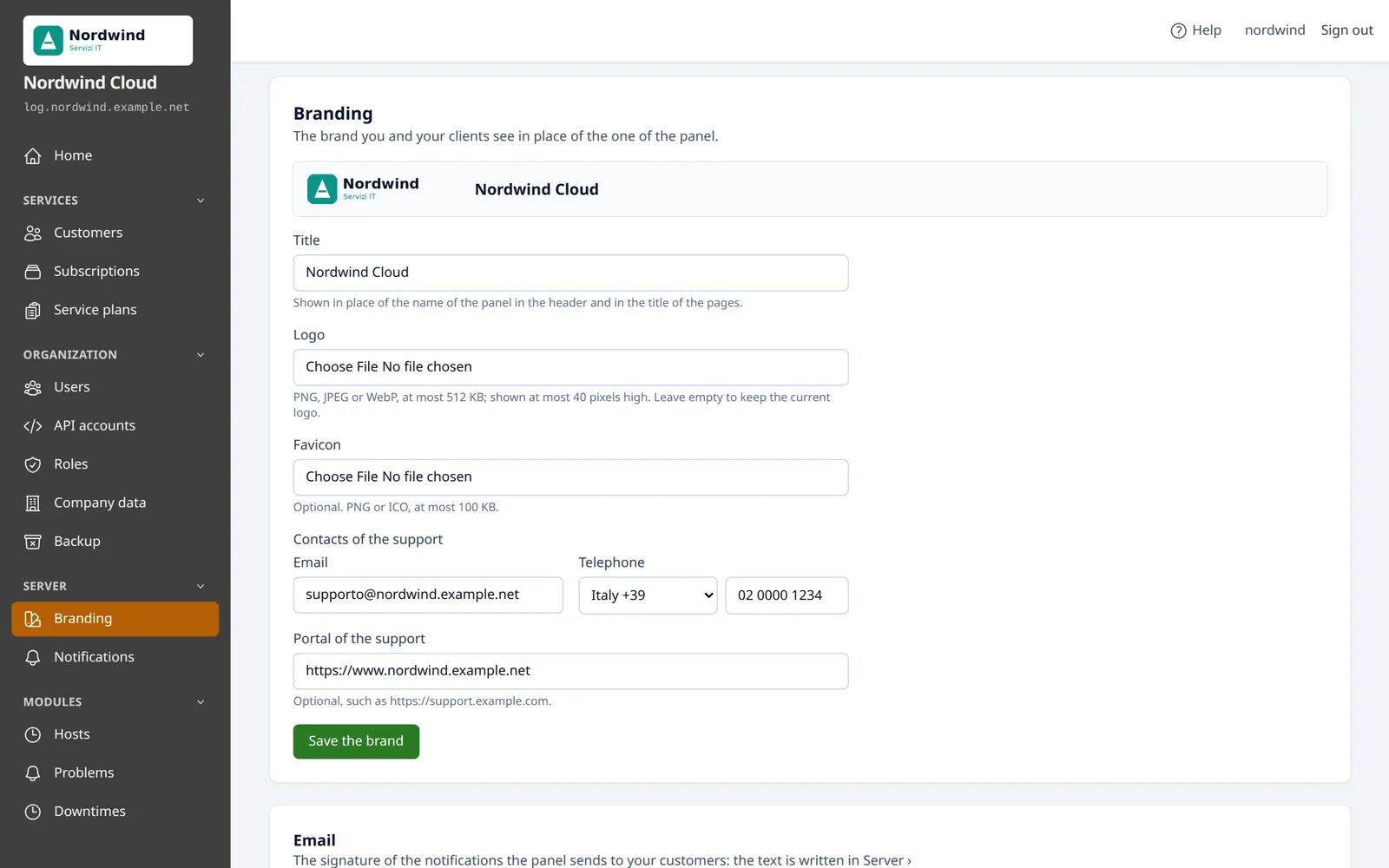
The Branding page of a reseller, with the logo, the title and the support contacts
The brand of a reseller: logo, title and support contacts. Sample data.

Supporting your customers

You see what it takes to help them, without asking for their credentials.

Their subscriptions
You open them as the customer sees them, within the limits of your role: to check that the logs of a device arrive, look at a problem of a host, read a report
The notifications sent
Those of the last 90 days, with the addresses reached: to check whether an alert left
The backups of the customers
You make them, the customer does not see them and they do not count in their space. A deleted subscription can be recreated from a copy
Different roles
You give your staff different roles: one manages the customers, one only follows support
Internal notes
On each customer, visible only to you

The API, for billing and automation

Your programs create customers and subscriptions, suspend and reactivate them, change plan and read the usage, without going through the pages. It is mostly for a billing system, such as WHMCS, which activates and suspends the services with the payments.

API accounts
Each with a role, which decides what it can do: a billing system manages customers and subscriptions, not the backups
The keys
One per program or server, with an expiry if you want: you revoke one without stopping the others
The external reference
Customers and subscriptions carry the code they have in your billing system
Requests that can be repeated
Repeating a creation after a network error does not make a duplicate
The documentation
It is generated by the panel itself: it always matches the installed version

For providers: the resellers

With the Provider license you create resellers, each with their own customers and their own brand.

The reseller plan
It decides how many customers and subscriptions the reseller can have, which services they can resell and how many resources they can hand out in total
The resources
For each resource you see how much the reseller has assigned to the customers, the measured usage and how much their plan allows
Overselling
With overselling the limits assigned can go beyond the plan in total: the measured usage says how prudent that is
From customer to reseller
An existing customer can become a reseller and keeps their subscriptions

Try selling a service

The trial license lasts 15 days and lets you try the three levels: a reseller, a customer and a subscription.