Esapanel Italiano Free trial

Modules › CSP

CSP · Central Syslog

The logs of servers and devices: collected, searched, read.

CSP (Central Syslog) collects the logs of servers and network devices: successful and failed sign-ins, errors, warnings, events of firewalls and VPNs. It keeps them in the subscription of each customer, alerts when something happens and summarises them in reports.

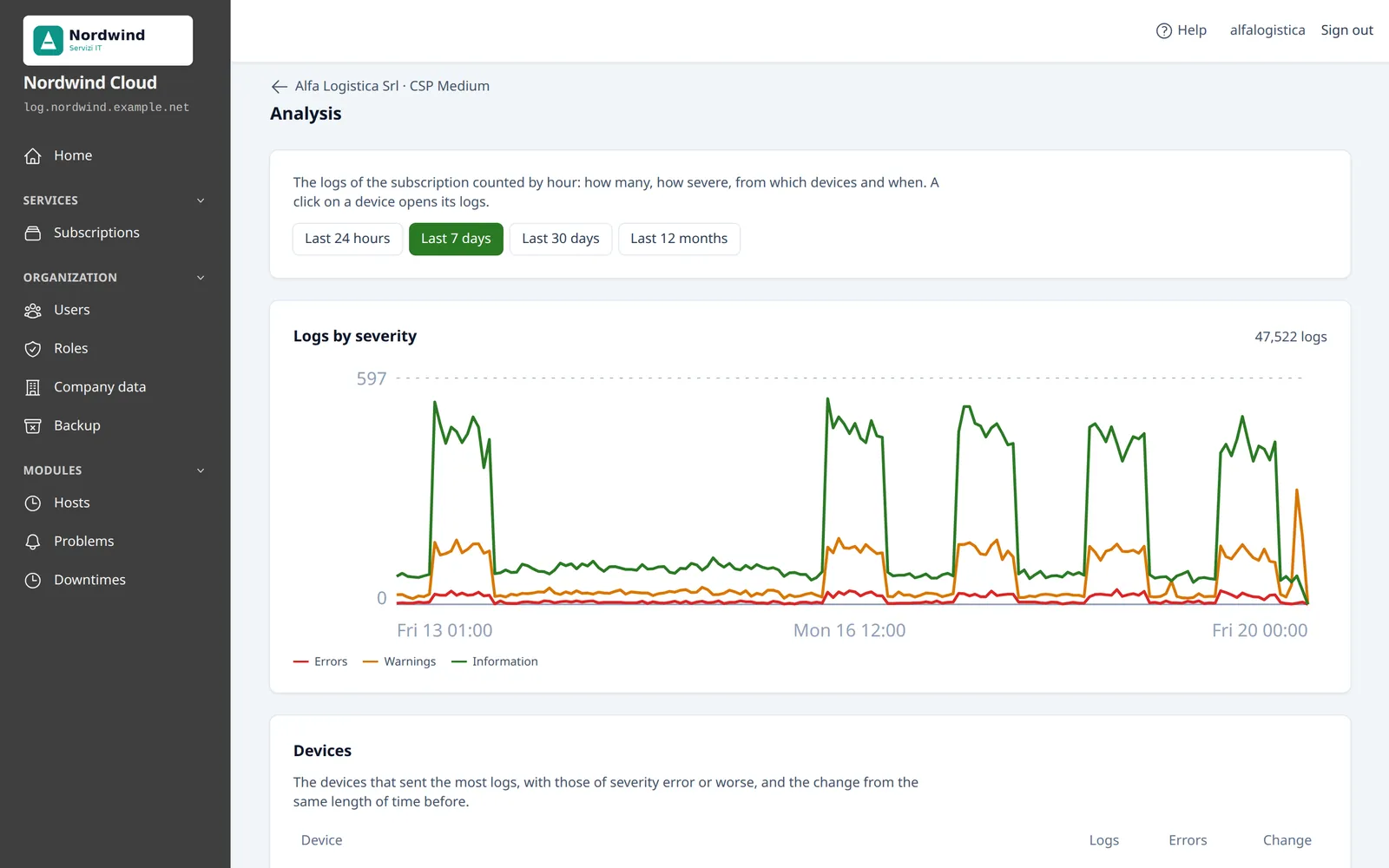
The Analysis page of a CSP subscription: the chart of the logs by severity over the last 7 days
The analysis of the logs of a subscription: how many, how severe, from which devices and when. Sample data.

Where the logs come from

Each subscription receives on its own ports, in clear or encrypted with TLS. The devices connect out to the panel: no inbound port has to be opened at the customer's.

Routers, firewalls and other devices

With the syslog protocol, the standard that almost every network device knows: UDP or TCP, RFC 3164 or RFC 5424, over TLS too.

  • Instructions already filled in on the page of each device
  • Guides of their own for MikroTik, pfSense and OPNsense

Windows and Linux servers

With the Esapanel agent, a small program that reads the events of the server and sends them to the panel encrypted, with a certificate of its own.

  • The events arrive with their fields: user, source address, event, outcome
  • As an alternative, NXLog on Windows and rsyslog on Linux

The logs of past years

The old syslog server, a NAS, a folder of files: the import brings them into the subscription, where they are searched like the others.

  • From your computer, from a server over SFTP or from HTTPS addresses

Only the logs of the authorized devices enter the subscription. Those of an unknown sender wait in the quarantine, to authorize or discard.

Noticing, not only keeping

The event alerts read the new logs every 3 minutes and write when there is something worth a look. There are no rules to write: the predefined ones are already on.

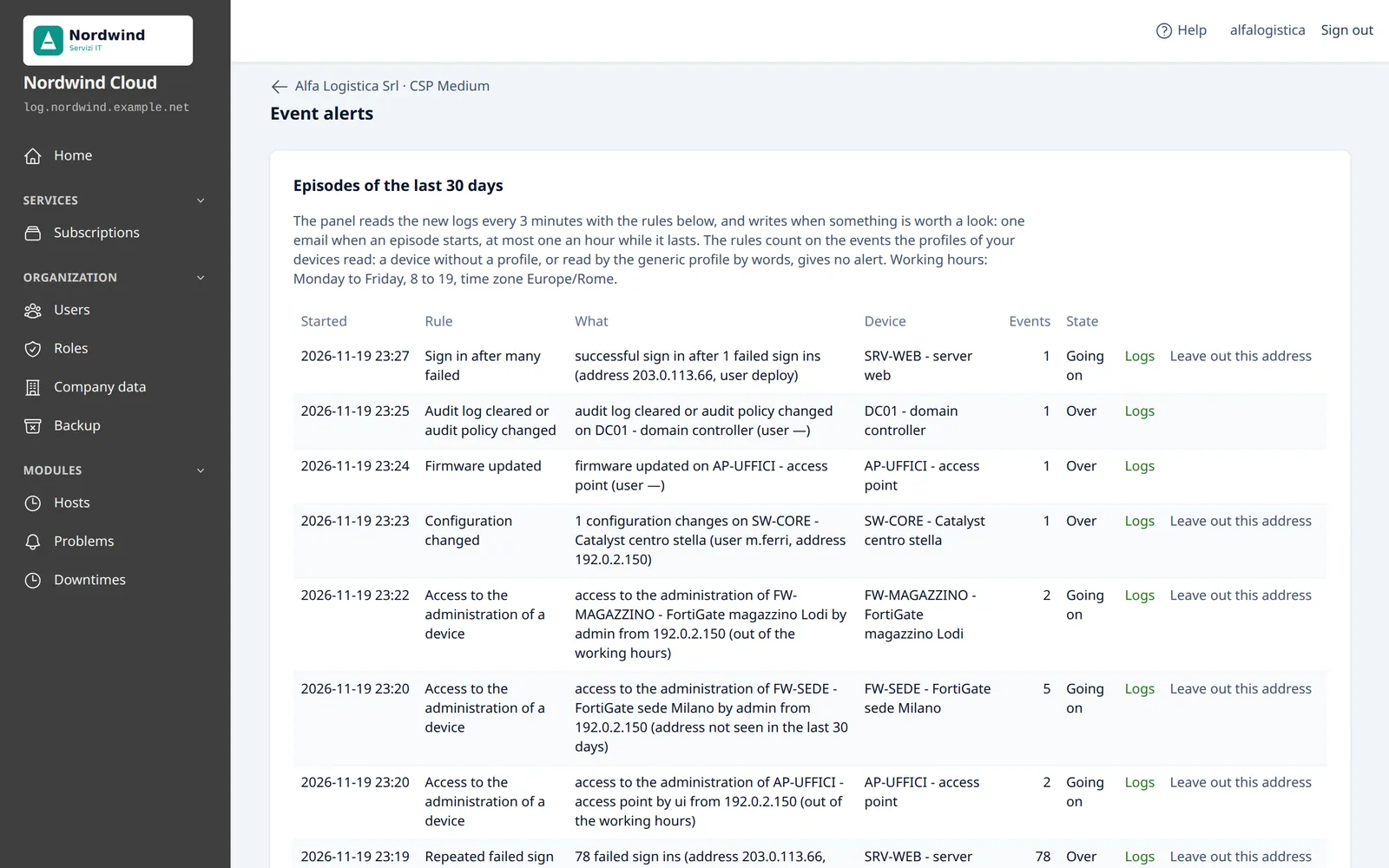
The events that follow one another make up an episode: 34 failed sign-ins in 10 minutes from the same address are one episode, not 34 emails.

Those who want to can add rules of their own, also starting from a log with Alert me if it repeats, and exceptions for the known false alarms.

Repeated failed sign ins
Someone is trying to guess a password
Sign in after many failed
The attempt may have worked
Access to the administration of a device
On a firewall or a router, outside working hours or from an address never seen
Configuration changed
With who changed it and from where
Accounts created or changed
A user created, deleted, locked or added to a group
Blocked attacks above the norm
Many times more than the same hour in the 14 days before
Attack from the internal network
An infected computer or a compromised device
VPN unstable
A VPN failing many times in an hour
The Event alerts page, with the episodes of the last 30 days
The episodes of the alerts: failed logins, a cleared security log, a changed configuration. Sample data.

Search, analyse, summarise

The search

By period, device, category and text. For the logs with the fields of the event, by exact value too: all the failed sign-ins of a user, everything an address did.

  • The order is by time of reception: it is right even if the clock of a device is wrong
  • The download is in CSV or as syslog text

The analysis

A page that is always up to date: the logs by severity over time, the devices that send the most and their change, the days and hours of the activity, the events recognized.

  • A device that sends much more or much less than usual shows at once
  • The counts stay for 25 months

The reports

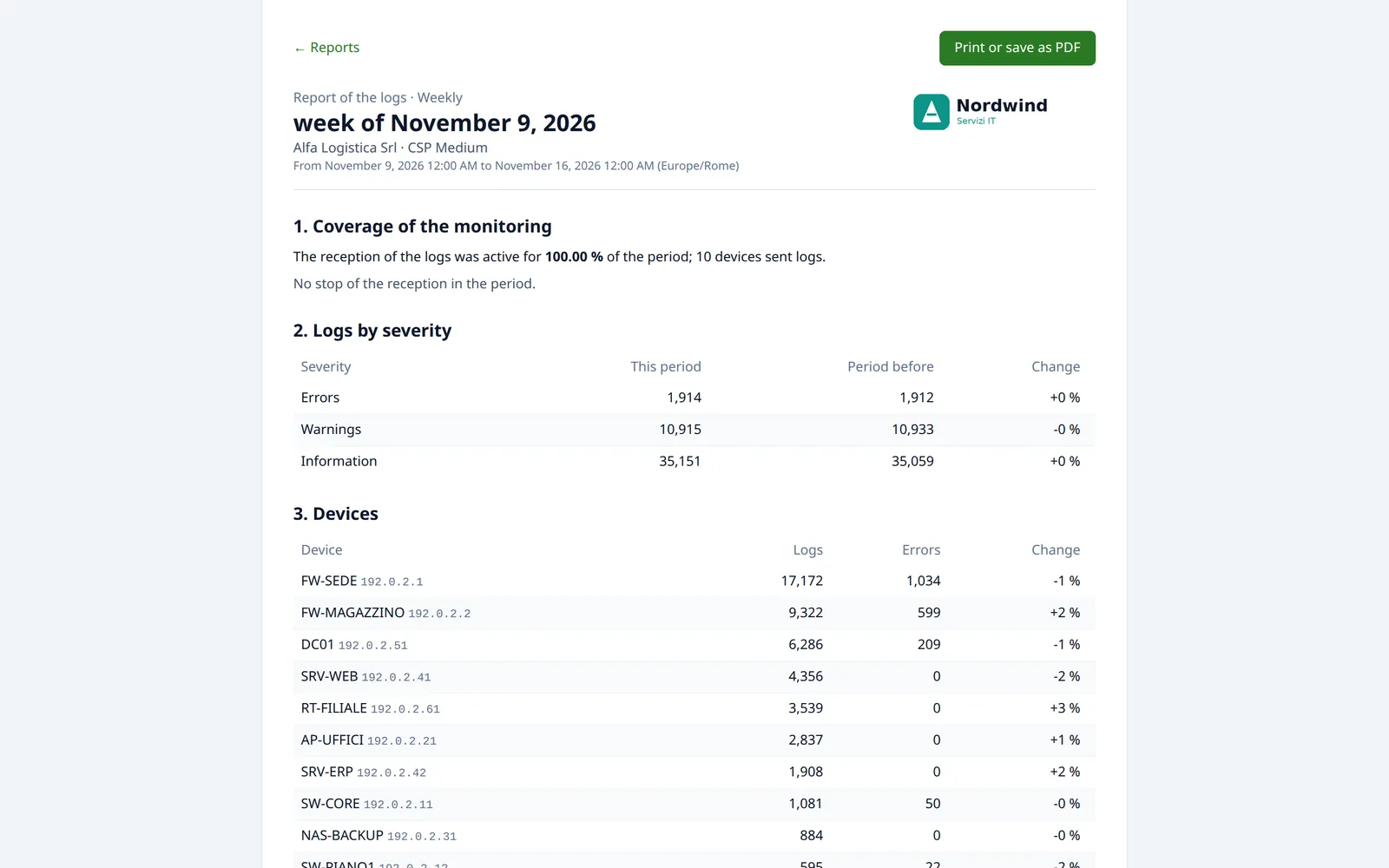
Daily, weekly and monthly: the coverage of the monitoring, the devices, the errors, the events, the episodes of the alerts.

  • A report, once made, never changes
  • At the bottom it has the SHA-256 fingerprint of its data, to show that a copy was not changed

Reports and NIS2. The directive asks you to detect incidents and to document the security measures. The monthly reports are a good basis: they say that the logs were collected, for how long the reception was active, which devices were silent and which events were detected.

A weekly report of the logs, with the coverage, the logs by severity and the devices
The weekly report, ready to print or save as PDF. Sample data.

Keeping

The logs stay searchable for the time the plan sets. After that they are not lost: they go to the archive.

Log archive
Every night the days older than the searchable period become archives to download, as compressed CSV
Backup of the subscription
The configuration, the searchable logs or both, by hand or scheduled, incremental and encrypted too
Remote destinations
The copies can go outside the server of the panel
A device that goes silent
An email when a device has not sent logs for longer than the time chosen, and one when it starts again

In your plans

Whoever holds the license decides what each plan offers. For CSP the plan of a subscription sets:

  • The number of devices
  • The monthly volume of the logs
  • How long the logs stay searchable
  • The space of the backups
  • The event alerts and how many custom rules
  • The reports
  • The import of old logs
  • The names of the addresses in the logs

Among the plans ready in the panel, CSP Medium and CSP Large include the reports; in the other plans they are added.

Try CSP on your server

The trial license lasts 15 days. The guides to connect servers and devices are in the documentation.